
Free Windows test – up to 20 process steps
Convert a Real Visio Process Diagram into an Excel-Compatible Data Table – Free
Keystone Lite starts with the Microsoft Visio diagram you already have. It extracts the process into structured data so you can inspect the steps, connections, branches, lanes, and phases before deciding whether the full workflow is worth using.
- Test your own Microsoft Visio (.vsdx) file
- Runs locally on a Windows computer
- Exports up to 20 process steps free
Every free Lite button on this page takes you to the complete download form below.
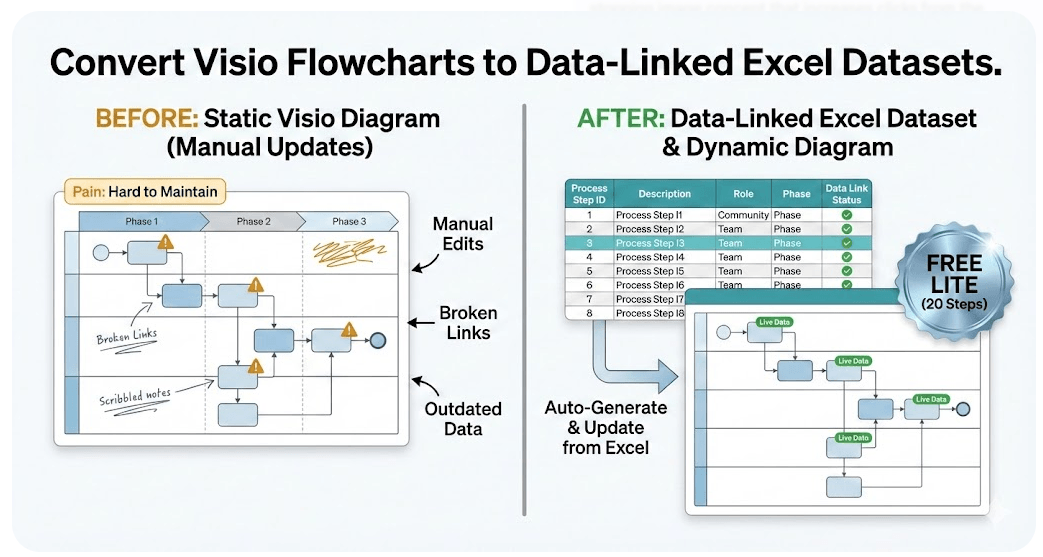
Keystone Does the Opposite of the Old Excel Data Visualizer Add-in
Microsoft Data Visualizer normally starts with structured data and creates a diagram. Keystone starts with an existing Visio diagram and creates the structured data.
That distinction matters. Keystone is not trying to replace Microsoft Visio. It is designed to recover the process model hidden inside a drawing so the process can be maintained, reviewed, analyzed, and re-rendered from data.
Start with the diagram
Your existing Visio process map, swimlane diagram, or cross-functional flowchart is the input.
Extract the process data
Keystone converts shapes and connections into a structured, Excel-compatible table.
Maintain and reuse the model
Edit the data, audit the process, analyze it, or use it in a Visio Data Visualizer workflow.
Your Visio Diagram May Look Finished. That Does Not Mean You Have a Maintainable Process Model.
A process diagram can look perfectly respectable and still leave you with the same expensive problem: every meaningful change requires opening the drawing, finding shapes, moving boxes, repairing connectors, checking the lanes, and hoping another copy of the process has not already drifted in a different direction.
The diagram is useful as a view. The difficulty begins when the drawing is also forced to serve as the only source of truth.
Keystone changes the job from maintaining a picture to maintaining structured process data. The drawing can still be used, but the steps and relationships are no longer trapped inside it.
A flat export gives you pieces
- Shape text without reliable process sequence
- Rows without explicit branches
- Information that still requires manual reconstruction
- No dependable model for refreshing or comparing views
Keystone is built to preserve the process
- Stable Process Step IDs
- Explicit Next Step IDs and connections
- Decision branches and connector labels
- Function and Phase fields for lanes and columns
11-minute demonstration – use only the chapter you need
See the Software Before You Install It
The full walkthrough is available below. The chapter links open the video at the exact section so you do not have to search through all 11 minutes.
The Conversion Itself Takes 3 Straightforward Steps
You do not need to rebuild the process in Excel before you can test the idea. Start with the diagram you already trust enough to use today.
Open Keystone Lite
Unzip the download and run the Windows executable.
Select the Visio file
Choose the Microsoft Visio (.vsdx) process diagram you want to test.
Export the dataset
Lite converts up to 20 process steps so you can inspect the structure and test the workflow.
The Output Is More Than a List of Shape Text
Keystone is designed to create the fields needed to represent the process as connected data, not merely as disconnected boxes copied into rows.
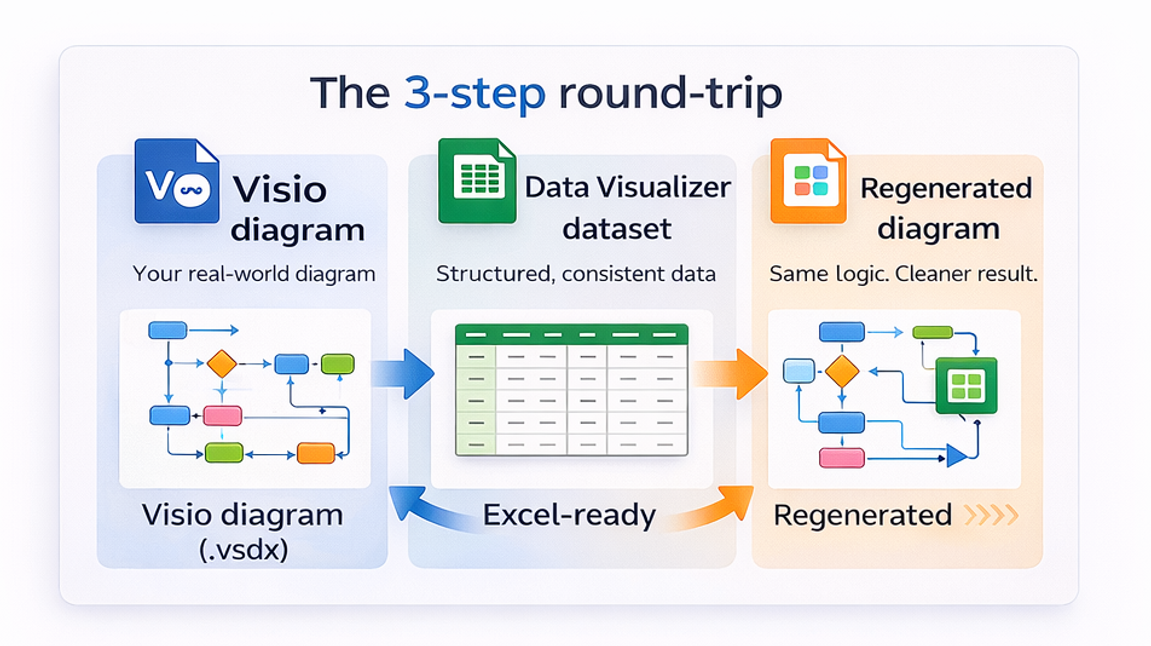
The Real Payoff Begins After the 1st Export
Once the process is represented as structured data, the work becomes easier to review, update, compare, audit, and reuse.
Keystone Is Not for Everyone – Which Is Exactly Why Lite Exists
The fastest way to settle the question is not another sales promise. It is to run 1 real file and inspect the output.
Keystone is a strong fit when…
- You already have a Visio process diagram.
- The diagram contains meaningful sequence, branching, lanes, or phases.
- You need the process in Excel-compatible data.
- You want to avoid manually rebuilding every process step and connection.
- You want to review, audit, analyze, or re-render the process from data.
Keystone is not the right tool when…
- You need software that discovers a process from system event logs.
- You need a workflow engine that executes and routes work.
- You need Microsoft Visio itself or a general diagram-drawing application.
- You need a full enterprise process repository and governance suite.
- You do not have a Windows computer available to run the software.
What Lite Can Prove Before You Spend $149
Lite is not a crippled slideshow or a generic sample. It lets you test the workflow against your own diagram, with a 20-step limit.
Lite can help you verify
- The software opens and runs in your Windows environment.
- Your Visio file can be selected and processed.
- The 1st 20 steps produce a useful structured table.
- The fields and process relationships are suitable for your workflow.
- The result is valuable enough to justify converting the complete diagram.
Lite is intentionally limited
- It exports up to 20 process steps.
- It is designed for evaluation, not full process libraries.
- It does not replace Visio, process mining, or workflow automation.
- It does not guarantee that every possible custom diagram will require no cleanup.
- Standard is required when you need the step limit removed.
Use 1 real file. Inspect the output. Decide with evidence.
Test Keystone Lite on 1 Real Visio Diagram – Free
Enter the email address where you want Keystone Lite and the 1st-run instructions sent. Then use your own Microsoft Visio file to see whether the diagram-to-data workflow is useful before spending anything.
- Free Windows software test
- Processes up to 20 steps
- Your Visio file stays local
Use 1 real file. Inspect the structured output. Decide whether Standard is worth buying.

If you have read this far, you may already know the answer
Need the Entire Diagram? Standard Removes the 20-Step Limit.
Start with Lite when you still need proof. Choose Standard when you already have full diagrams to convert and do not want the evaluation limit in the way.
$149
1-time purchase for the Standard download.
- Unlimited process steps
- Windows desktop software
- Instant ZIP download
- 30-day refund policy
Not certain yet? That is the reason Lite is above. Test the 20-step version before buying.
Frequently Asked Questions
Is Keystone Lite really free?
Yes. Lite is a free proof-of-workflow download. An email is used to send the download link and 1st-run notes.
What does the 20-step limit mean?
Lite exports up to 20 process steps from the diagram. The limit is intended to let you evaluate the dataset structure and test the workflow before buying Standard.
Does Keystone take Excel data and create a Visio diagram?
No. Keystone does the reverse. It starts with an existing Visio diagram and creates structured, Excel-compatible process data.
Is Keystone the deprecated Data Visualizer add-in for Microsoft Excel?
No. The Microsoft Excel add-in started with data and rendered a diagram. Keystone is independent software that starts with a Visio diagram and extracts the process into data.
Does Lite upload my Visio diagram to a cloud service?
No. Lite runs locally on Windows. Your diagram and dataset stay on your machine unless you choose to share them.
What types of diagrams are the best fit?
Cross-functional flowcharts, swimlane diagrams, and other process diagrams with meaningful sequence and connections are the strongest fit.
What should I do if Visio rejects the resulting dataset?
Many import failures are dataset validation issues, such as duplicate IDs, missing referenced IDs, invalid shape types, or missing lane and phase values. Use the Data Visualizer import troubleshooting guide.
What changes when I upgrade to Standard?
Standard removes the 20-step evaluation limit so complete diagrams can be converted.
Technical Resources and Related Pages
These links preserve the technical and supporting material from the previous page and keep this download page connected to the Visio Data Visualizer website silo.
Microsoft, Visio, and Excel are trademarks of Microsoft. Keystone is an independent tool and is not affiliated with or endorsed by Microsoft.